When setting up data in your spreadsheet you will benefit from taking some time to get the data in a format that will help with both data entry and later use of that data for charting and analysis. A good data set-up shouldn’t be too cumbersome to create and will save you lots of time as you use the data.
Basic Rules
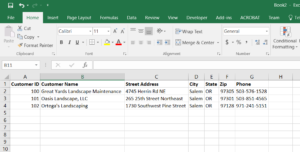
- Headers go in Row 1
- They should be in bold font
- No two headers should be exactly the same
- Each column should hold 1 piece of data
- What constitutes a piece of data depends on your use of the data
- You could put a whole address in 1 column – but if you might ever want to see the data from a single state then there should be a separate column for State
- You can separate data like first name and last name and then generate a column that combines this data for reporting
- Any given column should have the same data from top to bottom
- What constitutes a piece of data depends on your use of the data
If you have any questions, comments, or points that I missed please add a comment so I can respond. If you have a specific set-up you would like help with please send me an email (Contact Us)